Introducing Kettle: a job site scraping side project.
AI transparency: Human written, AI as a proof reader6 min read
My wife (Mrs W) is a teacher, bouncing between different schools across the area. One day she might be with a grumpy Year 6 preteen class; the next day, with a Reception class still missing their mums. A few weeks ago, Mrs W was asked:
‘Did you apply for the job we had going? You’d be great for it!’
Mrs W was confused; she checked the job boards daily but hadn’t seen any roles at that school. To cut a long story short, the school had posted it only on its own careers page.
Around 450 primary schools across six local authorities are within a reasonable commute for Mrs W. Even if 90% of those schools reliably use the same few job boards, that’s still 45 schools to check manually for jobs, impossible to do regularly.
This is where Mrs W is lucky. After she came home and bemoaned a job she never got to apply for, I thought, “You can automate that”. So automate is what I did.
Job searching done before the kettle boils.
Screen recording of a walkthrough of the Kettle app. It starts with onboarding, where a new user sets up their preferences, then moves to the jobs list. The recording ends by clicking a teaching role to open its details
The idea was simple in principle. Get a list of all the schools Mrs W could reasonably commute to within 60 minutes door-to-door. From that list, I could narrow it further based on personal preference: think Ofsted ratings and her personal experience with a school. Then set up a daily scrape of those school websites to see if any vacancies pop up, regardless of whether they’re posted on the local job boards.
It’s called Kettle because, if everything works correctly, Mrs W can check for new jobs before her tea has brewed at morning break. The engine that powers the search is called Sift - inspired by Mrs W’s love of baking. Sift checks schools, calculates commutes, and filters jobs using rules she sets herself.
Design before code
My first step was launching Claude Code and the Superpowers skill. Superpowers doesn’t let Claude write any code without first brainstorming, scoping and writing a plan. Building in this manner is really helpful for a designer who doesn’t fully understand code. I know what is possible; I broadly understand the loose structure required, but I need a bit more hand-holding to make something that works.
For those interested in the tech side: Kettle is built in Python and SQLite, with a React front end, Playwright for the awkward pages, and Claude Haiku reading the school websites. It runs on Fly.io, with Cloudflare handling the login. I’ll be writing a separate post on how I built it and worked with AI, in much more depth.
With that, we (Claude and I) had a three-stage plan:
Part 1: The schools
Starting with the national register of schools, I had over 50,000 potential UK school websites to scrape. Buuuut, filtering to only English primary-age schools left a much more manageable 19,000 sites - easy 😅.
I narrowed that to 259 by drawing a 35km radius around our nearest Metro station to create a smaller reference list. The Google Routes API then calculates the commute time to all 259 of those schools for a typical school morning arriving at both 8:00 and 8:15. To include a school in the list, all of these had to be met:
- Door to door in a maximum of sixty minutes.
- Only one bus or metro, to avoid missing connections if your first bus is late.
- Maximum of a twenty-minute walk
With these rules in place, Claude excluded 143 schools: 79 needed two or more transit legs, 63 took more than an hour, and a few failed because the walk at the other end was too long. That gave us 116. With help from Mrs W, we narrowed it to 71 schools (she removed 45 based on personal preferences).
Part 2. Job ingestion
With 71 schools on our radar, it was time to find the adverts. From Mrs W’s experience, I knew that there were a few reliable sources for new jobs, which I ranked on ease to read:
- The Department for Education’s official teaching vacancies feed
- Local job boards which schools pay to use
- Each school or trust’s own careers page
The DofE feed and job boards are easy for the site to read. School websites are harder because each one is built differently. Each morning, Kettle checks each school’s site for changes, and sends anything new (including PDFs and Word docs) to a small AI model (Anthropic Haiku). Haiku pulls out any teaching roles, along with a quote from the page as evidence, and plain code checks that quote really is there before anything reaches Mrs W.
In the early tests, it showed caretaker roles, headteacher roles, and Teaching Assistant jobs, so I added keywords and pay-scale banding to improve accuracy.
Part 3. The web app
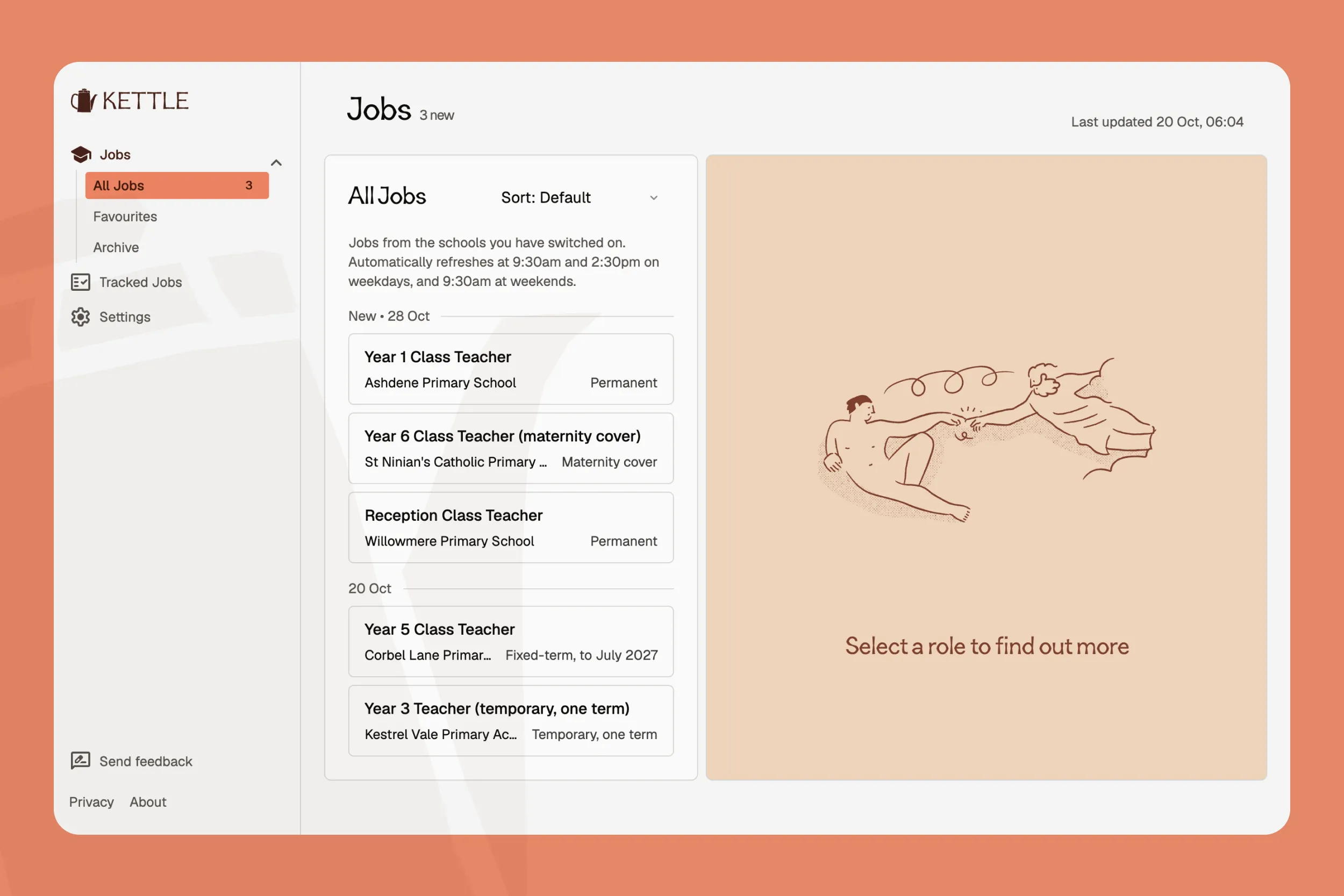 Kettle app screenshot showing a list of new teaching jobs, with school and contract type for each
This is the bit that Mrs W actually interacts with. It needs to be quicker and easier than checking the existing job boards, and it should show extra roles that official sources might miss.
Every time she logs in, Mrs W sees updates. The role, the school, contract type and an AI-generated summary of the role. The nice thing about designing for a user of one: I know for a fact that whenever Mrs W investigates a role, she wants to know:
- The Ofsted report
- The last inspection
- The school’s location on Google Maps
- The school’s website
So Kettle presents all of that in one view along with the commute. With each role, she can favourite it, archive it, or mark it as applied. Anything not marked as ‘applied’ is automatically removed from the site 24 hours after the closing date.
Sift sits underneath it all, checking schools against rules set by Mrs W. From the full list of 116 commutable schools, Mrs W can fine-tune by age group, contract type, pay scale, and Ofsted ranking. She can update these preferences whenever she wants; I don’t have to touch a thing.
Proof in the pudding
In simple terms, it works. Before even building the front end, Sift had already found a position at one of the schools from their website, two days before it was uploaded to the local job board site. Kettle has found a handful of roles in the two-ish weeks it’s been running. It’s taken a little tweaking, and we’re in a very quiet period for educational hiring, but it’s catching the few jobs that are coming out.
Privacy
I deliberately chose Metro stations as the starting point rather than commutes. Newcastle’s 60-station Metro system provides enough coverage for this stage of the build. It also makes the search much easier; mapping 450 schools against 60 Metro addresses (about 27,000 calls) is cheaper, quicker, and simpler than starting with the almost unlimited number of potential home addresses.
And from a privacy standpoint, I didn’t want my home address accidentally baked into the codebase or given to AI. But if Kettle ever expanded beyond my wife being the only user, I wouldn’t want the pressure (or legal obligations) that comes with storing any user’s addresses. If data ever leaked, it’s much better for public transit locations than a locatable home address.
Future plans
Next, I want to add notifications. Make it even quicker: new job detected: “🔔 New teaching role at X School”. I’m going to explore free email and text notification options.
I’m already working on how I would include additional users in a closed, invite-only beta. It would still have to be limited to North East primary teachers because Kettle scans a limited list of schools at this stage. But it would be really interesting to have a small group using the site from different starting points and job criteria.
I also want to see how Kettle could expand beyond the Newcastle Metro zones. Would I have to include bus stops and stations? Do I review my privacy commitment and allow general postcode areas? What are the cost factors of opening up the search bracket to 50,000 schools nationwide?
I’m also keen to add a Kanban board to track applications. My big question about that is how ‘smart’ to make it. Earlier this year, when I was job searching, I built a locally hosted Kanban that scanned my Gmail and automatically added and updated jobs I’d applied for based on the email contents. But people still have questions about whether they want to let AI tools into their email accounts.
This is one of four planned blogs on building Kettle.